LS2 Explorer
Putting the ST1 in the perfect helmet would have been easier, but that isn’t what happens in life.
I’ve been using the carbon version of the excellent LS2 MX701 Explorer for the past two years. Along with the superb fit, the frankly stunning optically perfect visor and its lightweight come the disadvantage that it can be a little noisy at autobahn speeds.
Up to 60mph, the LS2 successfully deals with wind noise from the Tracer’s screen. Over that, the wind roar gets irritating. On the KTM 1090, the cut-off point was about 45mph.
There is nothing wrong with the LS2, which has an angular design, or the motorcycles. Occasionally, you get an ill-matched pair, and hence the wind noise. Take the same helmet, the same rider, and the same ears and put them on a Ducati Multistrada, and wind and road noise are not an issue.
The other reason I picked the LS2 Explorer as the test helmet is the absence of speaker pockets in the lining. Yes, I could have picked a more accommodating helmet, but testing shouldn’t be like that. This is the real world.
Sena ST1 Installation
All of the Sena intercoms come with an array of thin Velcro pads that you place where you want the speakers and microphone to sit inside the helmet.
The absence of speaker pockets on the LS2 gave me a lot of options, and after a few test positions, I found a comfortable – I can’t feel them – position for the HD speakers.
For the microphone, I opted for the boom mic over the button mic and fed it behind the cheek pad on the left, with the business end of the microphone placed in the middle of the chin bar. The advantage the LS2 Explorer has is that with its extended oval shape, I can have the microphone directly in front of my mouth but still far enough away that I don’t know it is there.
All in all, it took about 30 minutes to get the placement of the internals where they were comfortable and in the right place for the associated part of my anatomy.
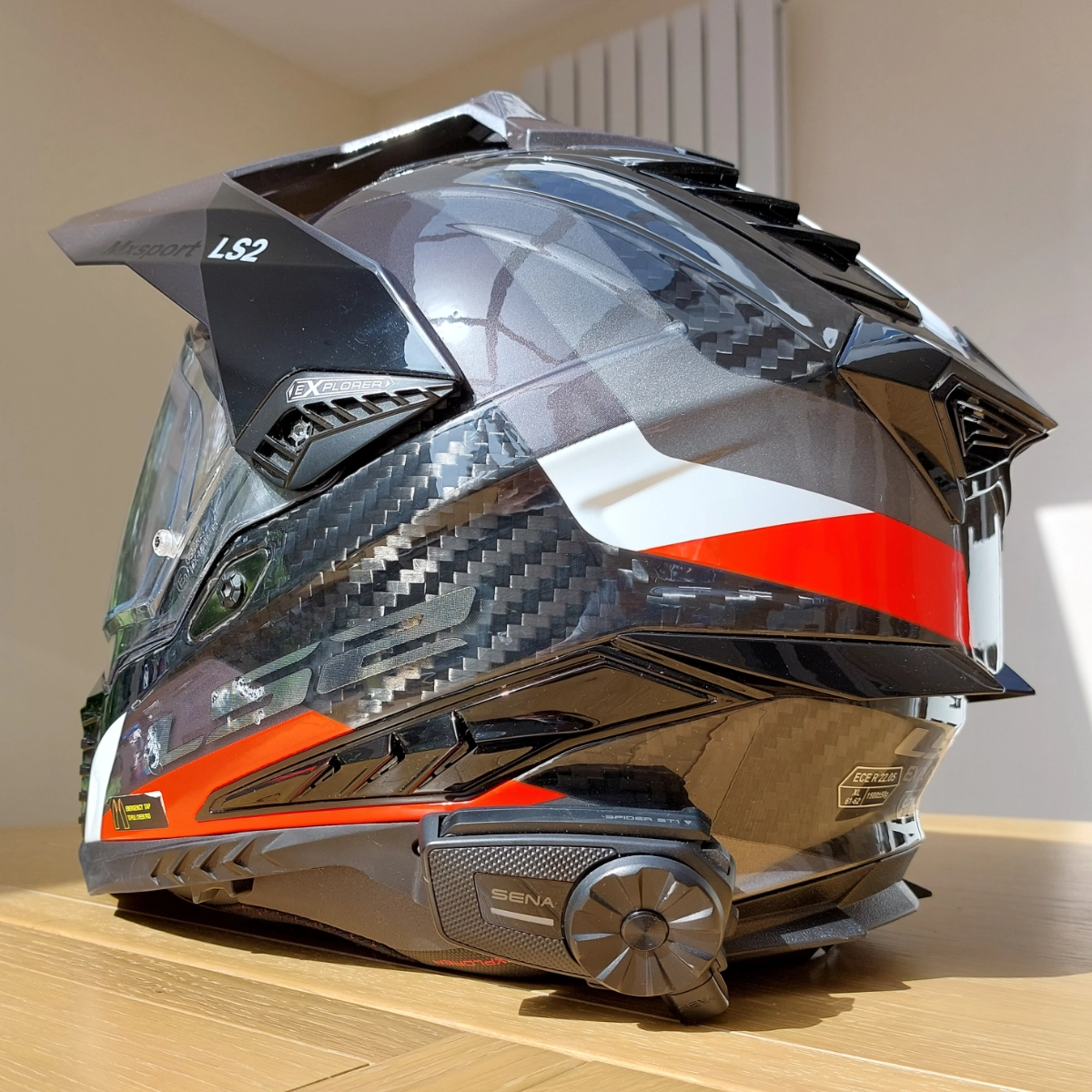
The angular styling of the LS2 Explorer added a little more time to the installation as I searched for the ideal spot to locate the main Sena ST1 unit. An adhesive mount secures onto the helmet’s shell, and the Sena ST1 clips into the mount.
The cables for the speakers and microphone are detachable from the main unit, but only for easy installation. Once connected, you can disconnect them if you wish, but the idea is that everything stays plugged in and attached to the helmet.
I did lots of pondering and thinking, followed by some considering and deliberating. Then there was a bit more pondering, but I eventually found the ideal spot, which also gave me a clean exit between the cheek pads and the neck roll for the cables.
Total installation time was about an hour, and it was a simple enough task. Most of the time, I spent deciding where I wanted things mounted and tucking the cables away. If I was doing it all again, I think it would take me about 15 minutes.
Sena ST1 Road Test
The familiar Sena “Hello” greeting that plays when the intercom is powered on, sounds dreadful compared to the same greeting on the Sena 50S. For a few moments, while I quickly worked through the menus to pair my phone, I wondered what Sena had done.
All that has happened is that Sena has reduced the quality of the synthesised voice. The quality of the music playback from my phone was a delight. I could even pick out some of Mick Fleetwood’s intricate drumming from the Rumours album (I’ll leave you to Google that reference).
The Sena ST1 has the same blended audio capabilities as the Sena 50S. I connect the Sena ST1 and my phone to my Garmin XT GPS so that phone calls and music route through the GPS to the intercom.
Using the blended audio channel – Sena calls this GPS Pairing is important. We covered this in-depth in the Achieving Audio Nirvana article.
 The short version of that article is that the digital Mesh technology and Bluetooth will assume you are using them exclusively unless you use the GPS Bluetooth channel. Using this blends the audio streams into a mellifluous auditory experience.
I also used the Sena ST1 to connect to the Honda NT1100 using Android Auto, with the same excellent results.
The Last Three Months
When using just Bluetooth connected to the Garmin GPS, the Sena ST1 has been faultless.
Turn the Mesh on, and the experience is still excellent; chatting with others on a ride out to the coast for tea and cake wasn’t a problem, while Nagging Nadia would tell me where to go.
This has been my everyday experience using the Sena ST1 – So simple that I take it for granted.
Occasionally, over the past months, I noticed that I was no longer hearing the GPS, but everything appeared connected. Turning the Sena ST1 off and on again – the universal fix for any technology – would restore all of the audio connections.
I can’t quite nail the circumstances under which this happens, and it has only happened a few times over several months and numerous hours of riding.
Using Mesh and Bluetooth together is perhaps one of the contributing factors, but if the source of the disconnect was the ST1 or the Garmin XT, I couldn’t tell you.
Once my infamous paranoia became aware of a possible disconnection, I’ve been waiting for it to happen again – which, of course, it never has.
Yet other than that one perplexing inconsistency, the ST1 has been rock solid.
Mesh Technology
If you have ever tried Bluetooth intercoms between two motorcycles, you will appreciate the pain of getting them to reconnect if you get separated.
Thankfully, today, we have Mesh. If another Sena intercom is on public Mesh and on the same channel (there are nine channels to choose from), riders will automatically join, leave, and rejoin the Mesh network.